
Last week I had good timepass playing around with a NetGear wireless router, My desktop, my BSNL EVDO device and my official laptop… The project was wireless networking to share my BSNL evdo internet connection.
I googled around for 2 days for some good material on how to network computers to share dialup internet connection. You can find enough material on networking but this requirement was unique so I had a tough time finding the right information. Finally I found one at
http://www.notebookforums.com/thread113829.html
I used a wireless router from NetGear. Not sure its the one same as the one at
http://www.netgear.com/Products/RoutersandGateways/WirelessGRouters/WGR614.aspx
The explanation above somehow didnt completely solve my issues but did upto 95%. Only difference being I had to use a static IP 192.168.1.2 on my laptop which being a client machine on which I was using the internet connection originally at my desktop PC (192.168.1.1). The wireless router was given a static IP 192.168.1.250 . So an all static IP network. My desktop PC failed to assign IP dynamically at times to the laptop, thats why I had to go with a static IP on the laptop.
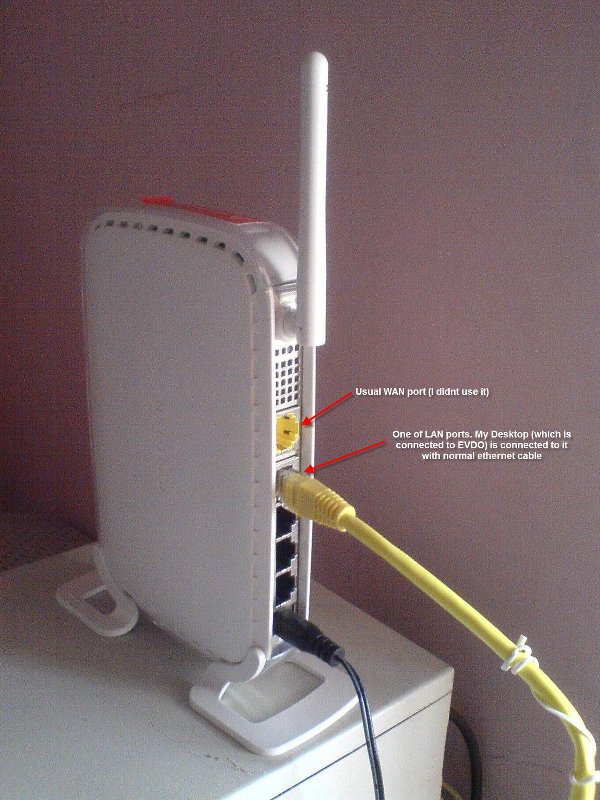
The configuration on the router is similar to what is explained at http://www.notebookforums.com/thread113829.html. If you are using NetGear and need assistance on similar configuration, do shout here !! I will be happy to help you out !!
Just an update.. There are other EVDOs like Reliance NetConnect EVDO and Tata Indicom Photon EVDO. These also can be configured the same way as explained above, or any such internet connection in general !
hey bro… i’ve a question to ask.. is it like i’ll always have to keep the computer on or will it be automatically connected to the network. say if i have connected the bsnl evdo on my desktop. and its not on at the moment i want to use my laptop. then?? will i have to first on the desktop, login to evdo then use the laptop?? plz help bro.. plz…
i wld be gr8ful…
plz…
thx in advance…
Yes, in this configuration, the desktop need to be on and logged into EVDO. Basically its its internet sharing here, but using the wifi router to connect to wireless devices such as laptops in network
Hi
I am in bangalore and my number is 9902226411. Would like to discuss with you more on how to connect my laptop which has EVDO connected to it to my mobile phone. I want to use the EVDO internet on my mobile.
Pls give advice.
@Mahesh,
If you are running Windows on your laptop, google for ‘ad hoc wireless networking’, where in you can configure your laptop to act as a wireless transmitter, sharing internet to your mobile.
I might not be able to talk to you personally, but post your queries here, we will try to resolve publically which can help others as well.
Thanks!
I like to connect EV-DO connection two more then 2 computer and i have linksys routers WRT54G so how can i connect to all three computer
@Rohit Patel,
The method will be the same, one of the LAN ports will be connected to the computer on which EVDO is plugged in and remaining computers on the other LAN ports.
Hello
I have netgear DG834PN and Evdo internet DSL. here is my problem. i connect the netgear with factory settings IP (192.168.0.1) and i have my other laptop configuring the network and get the IP such as (192.168.0.2) and everything looks ok. then i connect my Evdo with internet connection sharing ON. the network never bridge the internet connection from the desktop through the router. the network is good (signal strength, IP, …etc) but no internet connect. please help
Hello Ramkumar,
I have a netcafe running on a tataindicom broadband connection.Can i connect through EVDO to share all the systems , i have D-Link router ,Dir -300 , how can i connect with it ,plz help bro..
plz…i wld be gr8ful…
thx in advance…
with regards
I wish to see your mesg in mean time ……………
Hi Chandragiri Ramkumar,
The process to share EVDO is the same if you have a different router. Just follow the instructions above and let me know.
Thanks!
Hi Bro, I have one Desktop, laptop and One IP phone in my house. I am using local Broadband (Beam Cable), cable is directly connected to Netgear WGR614 Wireless router WAN Port and from router one cable is connected to my Desktop PC and other one to my IP Phone, now my doubt is what if I took BSNL EVDO connection, Netgear WIFI dont have USB modem, I dont understand,how to connect this EVDO USB card to the router,so that it acts like a source and supplies internet to my Desktop, Laptop and to my IP phone. Please help me Bro.
Hi Siva Shankar,
As per the above, you will need to connect evdo to your laptop/desktop then shared to others using the router. Please note, the above method assumes that you do not have a router with usb port to connect your evdo.
Thanks Ramkumar.
Regards,
Siva.
@SE0LI0N >>>> well im usin bsnl evdo and my phone is a wifi certified…so i wanna make use ov my wifi smartphone by having internet on my phone….i dont knw wat is wifi router or etc etc…all i knw is whenever im tryin to scan 4 any wlan connection in my phone…itz sayin “NO ACCESS POINTS FOUND”….i really dont knw wat is network mode like infrastucture or ad hoc….plzz tell me wat 2 select n wat not 2…wat is authentication ?….wat is ssid ? itz so complicated…i really dont knw wat 2 do…all i want is 2 get an internet connection on my wifi phone if possible..without payin any extra charges apart from payin my bsnl evdo bill…plzz respond 2 my Query as soon as possible….ur input wud be very much appreciated…any1 knw regardin these can reply 2 me….thank u guyz….
hi!l have an evdo internet connection that l want to share with three other computers through a host pc and a tp-link w841 wireless router.l hve tried various ways bt to no avail.anybody pliz help.